Solana by Example
Inspired by Rust By Example
Solana by Example is a collection of runnable examples that illustrate various Solana concepts and its libraries.
Now let's begin!
-
Hello Solana - Learn about how a client interact with a Solana program.
-
Counter - Learn about how to manage "state" on Solana.
-
Set Counter - Multiple instructions in one program.
-
WIP Blog - Learn about how to store text on Solana.
-
WIP Chat Room - build a chat room on Solana.
-
WIP Swap Program - Learn about SPL token, and associated account.
-
WIP NFT Program - Learn about how to create and manage metadata of NFTs.
Hello Solana
This section cover:
- Get the idea of client and program.
- How to deploy a Solana program
- Use a client to interact with the program
We will make a simple program that only log message: "Hello Solana" without framworks. And we will demo how to use Typescript and Rust client to interact with the program.
Program
Create a project called program
cargo new program --lib
Paste below code to Cargo.toml
[features]
https://docs.solana.com/developing/on-chain-programs/developing-rust#project-layout

When toggled on this feature will cause the crate to not compile a
bpf entrypoint.

See the corresponding `#[cfg(not(feature = "exclude_entrypoint"))]`
in lib.rs. This is needed so that other Solana programs can import
helper functions from this library without causing symbol conflicts
with our entrypoint.
exclude_entrypoint = []

[dependencies]
solana-program = "1"

[lib]
This is the name of the compiled file
For this example, the compiled file path is `target/deploy/hellosolana.so`
name = "hellosolana"
crate-type = ["cdylib", "lib"]
In lib.rs
use solana_program::{
    account_info::AccountInfo,
    entrypoint,
    pubkey::Pubkey,
    msg
};

// Declare the programs entrypoint. The entrypoint is the function
// that will get run when the program is executed.
#[cfg(not(feature = "exclude_entrypoint"))]
entrypoint!(process_instruction);

pub fn process_instruction(
    _program_id: &Pubkey,
    _accounts: &[AccountInfo],
    _instruction_data: &[u8],
) -> entrypoint::ProgramResult {
    msg!("Hello Solana");
    Ok(())
}
Compile the program
cargo build-bpf
Run test validator before deploy!
solana-test-validator
Deploy the program
solana program deploy target/deploy/hellosolana.so
If the deploy fails, check if you have enough SOL in your account
Check account balance
solana balance
Airdrop some SOL
solana airdrop 1
If the deploy success, you should see your program ID on the terminal. You should see different ID as mine.
$ solana program deploy target/deploy/hellosolana.so
Program Id: 4kwL8iV4WuCJv41rxeLqhAVxnuKRrZ9PFUSeBkY78BiW
Client (Rust)
Here is a simple Rust client.
Create a project called client_rust
cargo new client_rust
In main.rs:
use solana_client::rpc_client::RpcClient;
use solana_sdk::commitment_config::CommitmentConfig;
use solana_sdk::signer::keypair::read_keypair_file;
use solana_sdk::instruction::Instruction;
use solana_sdk::message::Message;
use solana_sdk::signature::Signer;
use solana_sdk::transaction::Transaction;

fn main() {
    let args = std::env::args().collect::<Vec<_>>();
    if args.len() != 3 {
        eprintln!(
            "usage: {} <path to program keypair> <path to signer keypair>",
            args[0],
        );
        std::process::exit(-1);
    }
    let program_keypair_path = &args[1];
    let signer_keypair_path = &args[2];

    // Establish connection
    let url = "http://localhost:8899".to_string();
    let commitment_config = CommitmentConfig::processed();
    let connection = RpcClient::new_with_commitment(url, commitment_config);

    // Get signer's Pubkey
    let payer = read_keypair_file(signer_keypair_path).map_err(|e| {
        panic!("failed to read keypair file ({}): ({})", signer_keypair_path, e);
    }).unwrap();

    // Get program's Pubkey (Program ID)
    let program_keypair = read_keypair_file(program_keypair_path).map_err(|e| {
        panic!(
            "failed to read program keypair file ({}): ({})",
            program_keypair_path, e
        );
    }).unwrap();

    // This will fail if the program is not deployed
    let program_info = connection
        .get_account(&program_keypair.pubkey())
        .expect("Fail to find the program");

    // On Solana every data are stored in Accounts
    // There are seversal types of accounts which we will cover later
    // So programs are stored as "binary" codes in "executable" accounts
    if !program_info.executable {
        panic!(
            "program with keypair ({}) is not executable",
            program_keypair_path
        );
    }

    // Make and send a transaction
    // Take this step as you send a HTTP request in web2
    let instruction = Instruction::new_with_bytes(
        program_keypair.pubkey(),
        &[],
        vec![],
    );
    let message = Message::new(&[instruction], Some(&payer.pubkey()));
    let transaction = Transaction::new(
        &[&payer],
        message,
        connection.get_recent_blockhash().unwrap().0
    );

    connection.send_and_confirm_transaction(&transaction);
}
In Cargo.toml:
[package]
name = "miniclient"
version = "0.1.0"
edition = "2021"

See more keys and their definitions at https://doc.rust-lang.org/cargo/reference/manifest.html

[dependencies]
solana-sdk = "1"
solana-client = "1"
Usage
- Run local test validator.
solana-test-validator - Open another terminal tab to run Solana console log where
"Hello Solana" will print at
solana logs - Open the third terminal tab to run this rust client
cargo run ../program/target/deploy/helloSolana-keypair.json \
~/.config/solana/id.json
You should see this on the second terminal:
Streaming transaction logs. Confirmed commitment
Transaction executed in slot 204888:
  Signature: 3tRkKQFttGMkRvE6LzD1WUFfjxqjCBGFBqiioFPx5TDztYXUdaod3AERdJBRj9jMS7hw9WjYAxcrLoiFgam6gogF
  Status: Ok
  Log Messages:
    Program 4kwL8iV4WuCJv41rxeLqhAVxnuKRrZ9PFUSeBkY78BiW invoke [1]
    Program log: Hello Solana
    Program 4kwL8iV4WuCJv41rxeLqhAVxnuKRrZ9PFUSeBkY78BiW consumed 197 of 1400000 compute units
    Program 4kwL8iV4WuCJv41rxeLqhAVxnuKRrZ9PFUSeBkY78BiW success
Congrat! we already finished our first progarm on Solana!
Client (Typescript)
Here is a simple Typescript client.
Scaffolding:
client_ts/
├── src/
│  └── main.ts
├── package.json
└── tsconfig.json
In package.json:
{
  "name": "hellosolana",
  "version": "0.0.1",
  "description": "",
  "repository": {
    "type": "git",
    "url": "https://github.com/n795113/solana-by-example"
  },
  "keywords": [],
  "author": "",
  "license": "MIT",
  "dependencies": {
    "@solana/web3.js": "^1.33.0",
    "mz": "^2.7.0"
  },
  "devDependencies": {
    "ts-node": "^10.0.0",
    "@types/mz": "^2.7.2",
    "@tsconfig/recommended": "^1.0.1"
  },
  "engines": {
    "node": ">=14.0.0"
  }
}
In tsconfig.json:
{
  "extends": "@tsconfig/recommended/tsconfig.json",
  "ts-node": {
    "compilerOptions": {
      "module": "commonjs"
    }
  },
  "compilerOptions": {
    "declaration": true,
    "moduleResolution": "node",
    "module": "es2015"
  },
  "include": ["src/client/**/*"],
  "exclude": ["node_modules"]
}
In src/main.ts:
import fs from 'mz/fs';
import {
  Keypair,
  Connection,
  TransactionInstruction,
  Transaction,
  sendAndConfirmTransaction,
} from '@solana/web3.js';

const RPCURL = 'http://127.0.0.1:8899';

async function main() {
  const args = process.argv.slice(2);
  if (args.length != 2) {
    console.log("Please pass program and payer's keypair paths!");
    process.exit(1);
  }
  const program_keypair_path = args[0];
  const payer_keypair_path = args[1];

  console.log("Let's say hello to Solana...");

  // Establish connection to the cluster
  const connection = new Connection(RPCURL, 'confirmed');
  const version = await connection.getVersion();
  console.log('Connection to cluster established:', RPCURL, version);

  // Get the payer to pay this transaction
  var secretKeyString = await fs.readFile(payer_keypair_path, {encoding: 'utf8'});
  var secretKey = Uint8Array.from(JSON.parse(secretKeyString));
  // Keypair is an object that has 2 properties: publicKey, secretKey.
  // Both of them are bytes so if we want to print them as strings,
  // we can encode them into Base58 by calling toBase58() method.
  const payerKeypair =  Keypair.fromSecretKey(secretKey);
  console.log("Payer: ", payerKeypair.publicKey.toBase58());

  // Get the program's pubkey (ID)
  secretKeyString = await fs.readFile(program_keypair_path, {encoding: 'utf8'});
  secretKey = Uint8Array.from(JSON.parse(secretKeyString));
  const programKeypair = Keypair.fromSecretKey(secretKey);
  const programId = programKeypair.publicKey
  console.log("Program ID: ", programId.toBase58());

  // Invoke our Hello Solana Program
  console.log('Sending the transaction...');
  const instruction = new TransactionInstruction({
    // This field accepts an array of accounts
    // However, our program doesn't use accounts' data in this example
    // so just pass an empty array.
    keys: [],
    programId,
    // Our program doesn't use instruction data in this example
    // so just pass an empty byte array
    data: Buffer.alloc(0),
  });
  await sendAndConfirmTransaction(
    connection,
    new Transaction().add(instruction),
    [payerKeypair],
  );

  console.log('Success');
}

main().then(
    () => process.exit(),
    err => {
      console.error(err);
      process.exit(-1);
    },
);
Usage
- Run local test validator.
solana-test-validator - Open another terminal tab to run Solana console log where
"Hello Solana" will print at
solana logs - Open the third terminal tab and change directory to
client_ts/to install dependenciesnpm install - Run this rust client
ts-node src/main.ts ../program/target/deploy/helloSolana-keypair.json \
~/.config/solana/id.json
You should see this on the second terminal:
Streaming transaction logs. Confirmed commitment
Transaction executed in slot 44967:
  Signature: 8aq8hNW9iTEL5UVfE2Ttwi1v9C382yuvtoLX1h4vsvTtRzYgQxd5psSB7Cnj7qstTWqxHeyTASLA4Kf3x33QNwV
  Status: Ok
  Log Messages:
    Program 4kwL8iV4WuCJv41rxeLqhAVxnuKRrZ9PFUSeBkY78BiW invoke [1]
    Program log: Hello Solana
    Program 4kwL8iV4WuCJv41rxeLqhAVxnuKRrZ9PFUSeBkY78BiW consumed 197 of 1400000 compute units
    Program 4kwL8iV4WuCJv41rxeLqhAVxnuKRrZ9PFUSeBkY78BiW success
Congrat! we already finished our first progarm on Solana!
Explain
Client & Program
"Program" is "Smart Contract" in Solana. It just terminology difference.
If you are a web3 newbie, you may take programs (smart contract) as AWS Lambda functions.
Just like client-server model that we are familiar in web2, we develop and deploy prgrams online then use clients to interact with them. it can be any kind of client, such as a typescript client, or a Rust client.
Account
Accounts are just buffers that store serialized binary on chain. Every data on Solana are stored in accounts.
Program
Program are not special, they are also data, stored in accounts. These accounts are flagged as executable and ownership is transferred to an ebpf loader program.
Programs on Solana are stateless which means we need to pass states from other places which you may already guess: other accounts.
States
Oppisite to programs, states are stored in non-executable accounts which can be 2 types:
- writable
- read-only
You may think state accounts as rows in database. We will introduce how to modify and query them in a later example.
Resources
ok so what the fuck is the deal with solana anyway
Counter
In this example, we will implement a counter on Solana. When a user invokes the program the counter will add 1.
Concepts that we will learn about:
- Program Derive Address (PDA)
- Serialize & deserialize data
This example was originally from the program, example-helloworld, of Solana-labs. I rename it since I think its core function is a counter, which is a good example to demostrate how state data stored on Solana.
Program Derive Address (PDA)
There 2 properties of an account:
- owner: who can modify the account
- authority: who can sign the account
PDAs are just specific accounts that have no private keys their authorities are belongs to programs.
Here is a good image from Solana Cookbook to show the difference between ownership and authority:
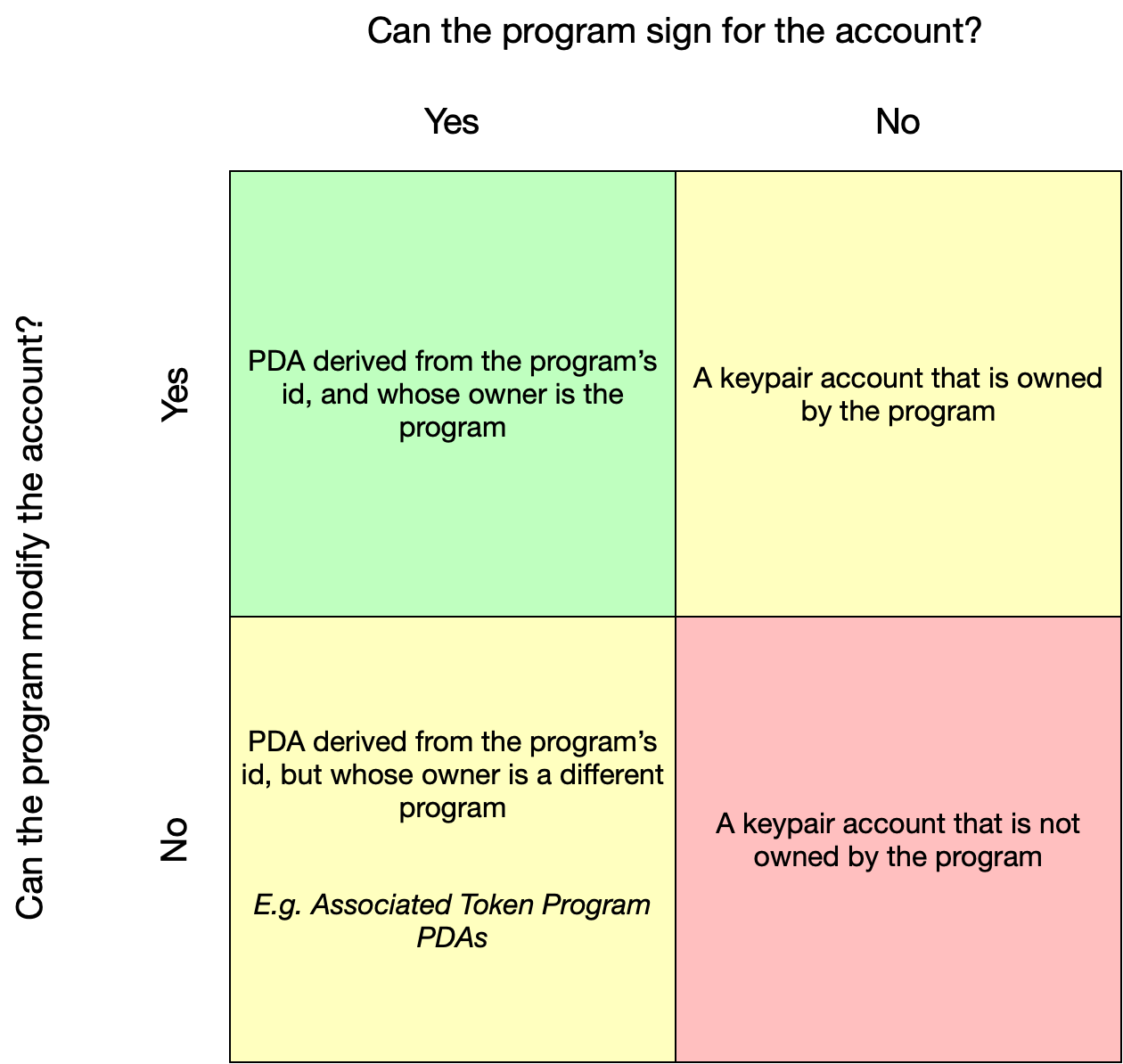
In this example. We will use a PDA to store the counter value!
Why PDA
PDAs serve as the foundation for Cross-Program Invocation, which allows Solana apps to be composable with one another.
Rent
Accounts need to be PAID to live on the chain. The fee is depends on how much data an account holds, and how long it will live. We will see how to count the fee in this example.
More detail about rent from official doc
Program
Again, this example is originally from Solana-labs. I just renamed some parts of it so it makes more sence to me. Feel free to check out the origin repo.
First, let's declare a struct, which represents the account to hold the counter:
use borsh::{BorshDeserialize, BorshSerialize};

#[derive(BorshSerialize, BorshDeserialize, Debug)]
pub struct State {
    counter: u32
}
Then we update our process_instruction in main.rs.
The main difference from the Hello Solana Program is we will use program_id, and accounts this time.
pub fn process_instruction(
    program_id: &Pubkey,
    accounts: &[AccountInfo],
    _instruction_data: &[u8], // still won't be used in this example
) -> entrypoint::ProgramResult {

    // Iterating accounts is safer than indexing
    let accounts_iter = &mut accounts.iter();

    // Get the counter account
    let account = next_account_info(accounts_iter)?;

    // The account must be owned by the program in order to modify its data
    if account.owner != program_id {
        return Err(ProgramError::IncorrectProgramId);
    }

    // Deserialize the state infomation from the account
    let mut state = State::try_from_slice(&account.data.borrow())?;

    // Modify it
    state.counter += 1;

    // Then write it back
    state.serialize(&mut &mut account.data.borrow_mut()[..])?;

    Ok(())
}
The logic is simple:
- Get the account
- Check the account is owned by the program
- Modify it and write it back
Client (Typescript)
First, let's generate an address for our state account. This address is special compared to other anther accounts since it is a hash instead of a public key.
const accountSeed = 'solana-by-example'; // can be any string

const accountAddress = await PublicKey.createWithSeed(
    payerKeypair.publicKey,
    accountSeed,
    programId,
); // The result looks like a public key but is just a hash
Second, check if this accounts has already created on chain. If not, then send a transaction to System Program to create an account using the address we generated.
var account = await connection.getAccountInfo(accountAddress);
if (account === null) {

    // The account only holds an u32 number so the size is 4 bytes
    const constAccountSize = 4

    // Count how much rent should be paid for this account
    const rentFee = await connection.getMinimumBalanceForRentExemption(constAccountSize);

    const transaction = new Transaction().add(
        SystemProgram.createAccountWithSeed({
        fromPubkey: payerKeypair.publicKey,
        basePubkey: payerKeypair.publicKey,
        seed: accountSeed, // "solana-by-example"
        newAccountPubkey: accountAddress,
        lamports: rentFee,
        space: constAccountSize,
        programId,
        }),
    );
    await sendAndConfirmTransaction(connection, transaction, [payerKeypair]);
}
Third, send another transaction to our Counter Program by passing the account we get at step 2. The Counter Program then should modify the data of the account.
const stateAccount = {
    pubkey: accountAddress,
    isWritable: true,
    isSigner: false
}

const instruction = new TransactionInstruction({
    keys: [stateAccount],
    programId,
    data: Buffer.alloc(0), // instruction data won't be used by this example
});

await sendAndConfirmTransaction(
    connection,
    new Transaction().add(instruction),
    [payerKeypair],
);
Finally, query the account again to check if the data is updated.
account = await connection.getAccountInfo(accountAddress);

if (account === null) {
    throw 'Error: cannot find the greeted account';
}

const StateAccountSchema = new Map([
    [StateAccount, {kind: 'struct', fields: [['counter', 'u32']]}]
]);

const state = borsh.deserialize(
    StateAccountSchema,
    StateAccount, // State class
    account.data
);

console.log(
    'Address:'
    accountAddress.toBase58(),
    'counter:',
    state.counter
);
add State class outside the main function. It is similar to the struct we did in program.rs:
class StateAccount {
    counter = 0;
    constructor(fields: {counter: number} | undefined = undefined) {
        if (fields) {
            this.counter = fields.counter;
        }
    }
}
Usage
ts-node src/main.ts ../program/target/deploy/counter-keypair.json \
~/.config/solana/id.json
The counter should increases 1 every time this client runs.
This is the result that run the client 2 times:
$ ts-node src/main.ts ../program/target/deploy/counter-keypair.json \
~/.config/solana/id.json

Payer:  46hytJBhguswo6S8fCcVtR85HEnb9nd1hwMxFWYnSHXc
Program ID:  GuoMVjGXrxDvJaKuRfuKZsiwSHrfvfXg2YH7DTxGqdQe
Creating account: CzZRqZHR4ZEcoyJs61WRFJZP2iX2siPHwVVMGwu3iFdt
Sending the transaction to Counter Program...
Address: CzZRqZHR4ZEcoyJs61WRFJZP2iX2siPHwVVMGwu3iFdt counter: 1
Success
$ ts-node src/main.ts ../program/target/deploy/counter-keypair.json \
~/.config/solana/id.json

Payer:  46hytJBhguswo6S8fCcVtR85HEnb9nd1hwMxFWYnSHXc
Program ID:  GuoMVjGXrxDvJaKuRfuKZsiwSHrfvfXg2YH7DTxGqdQe
Sending the transaction to Counter Program...
Address: CzZRqZHR4ZEcoyJs61WRFJZP2iX2siPHwVVMGwu3iFdt counter: 2
Success
We can see at the first time, the client create a new account, and its counter is 1. At the second time, since the account is already existed, the client doesn't create an account again. It just take the existed account, and add its counter to 2.
Activity
What will happen if the seed changes every time? (now it is hard coded as "solana-by-example")
Set Counter
This is an improved version of Counter example. Besides the increament instruction, we will add 2 more instructions: decreament, and set value!
In this example, we will learn how to branch instructions after entering the endpoint of a program. Still, we will implement this in vanilla Rust.
This example was originally from Josh's tutorial from his channel. Please check out this amazing channel right now!
Instructions
First, let's declare our instructions by adding a new file, instructions.rs.
Scaffolding:
client_ts/
├── src/
│  ├── instructions.rs
│  └── main.rs
└── Cargo.toml
In instructions.rs:
#[derive(Debug)]
pub Enum Instruction {
    Increment,
    Decrement,
    SetValue(u32)
}
If you are not familar with Enum in Rust, please check this out.
Purpose: when an instruction data (&[u8]) be passed into our program, we are gonna to resolve (unpack) it
into ethier above 3 instructions:
Instruction::Increment,Instruction::Decrement,Instruction::SetValue(val)
The program will then match the instruction to do different operations.
Unpack
Let's implement a method for unpacking (or say deserializing) the given isntruction data. In this example, we gonna to use the first byte to represent the instruction code:
- 0: Increment
- 1: Decrement
- 2: set value
If the given code is 2 (set value), a user should also pass an u32 number in the other 4 bytes after the first bytes which means the total length of the array should be 5.
Moreover, there is no uniform rule about how to arrange the instruction data. You can design your own patterns for specific purpoeses.
use solana_program::{program_error::ProgramError};

impl Instruction {
    pub unpack(input: &[u8]) -> Result<Self, ProgramError> {
        let (&ix_code, rest) = input.split_first().ok_or(ProgramError::InvalidInstructionData)?;

        match ix {
            0 => Ok(Instruction::Increment),
            1 => Ok(Instruction::Decrement),
            2 => {
                // an u32 value should occupy 4 bytes
                if rest.len() != 4 {
                    return Err(ProgramError::InvalidInstructionData);
                }
                let val: Result<[u8; 4], _> = rest[..4].try_into();
                match val {
                    Ok(bytes) => Ok(Instruction::Set(u32::from_le_bytes(bytes))),
                    _ => Err(ProgramError::InvalidInstructionData)
                }
            },
            _ => Err(ProgramError::InvalidInstructionData)
        }
    }
}
ix often represents "instruction", and tx represents "transaction".
Program
Include instractions crate, and add the instruction branching after the account-owner-check:
pub mod instructions;
use crate::instructions::Instruction;

// ...

let mut state = State::try_from_slice(&account.data.borrow())?;
let ix = Instruction::unpack(instruction_data)?;
match ix {
    Instruction::Increment => state.counter += 1,
    Instruction::Decrement => state.counter -= 1,
    Instruction::SetValue(val) => state.counter = val
}
state.serialize(&mut &mut account.data.borrow_mut()[..])?;
Don't forget to rename the variable name of instruction data
pub fn process_instruction(
    program_id: &Pubkey,
    accounts: &[AccountInfo],
    instruction_data: &[u8], // _instruction_data -> instruction_data
) -> entrypoint::ProgramResult {
    // ...
}
Client (Typescript)
The only difference from the last client example is that we will send a non-empty array of instruction data this time.
Recap our instruction codes:
- 0: increment
- 1: decrement
- 2: set value
If the given code is 2 (set value), a user should also pass an u32 number in the other 4 bytes after the first bytes which means the total length of the array should be 5.
Here is an example how to make the array:
var instructionData = Buffer.alloc(5, 0); // [0, 0, 0, 0, 0]

// The first byte is instruction code
instructionData.writeUint8(instructionCode, 0);

// The last 4 bytes reoresents an u32 value we want to set
instructionData.writeUInt32LE(inputValue, 1);
Our program will ignore the last 4 bytes if instruction code is 0 or 1 so I just alloc 5 bytes
for every cases. You can alloc only 1 byte on cases increment, and decrement of course. The
program should works the same.
A user should pass the instruction and value if the instruction is "set value".
Let's modify the arguments handling at the begining of the main.
const args = process.argv.slice(2);
if (args.length < 3) {
    console.log("Uasge: <instruction code> [value] <program keypair path> <payer keypair path>");
    process.exit(1);
}
const instruct = args[0];
var instructionCode = 0;
var inputValue = 0;
switch (instruct) {
    case "increment":
        instructionCode = 0;
        break;
    case "decrement":
        instructionCode = 1;
        break;
    case "set":
        instructionCode = 2;
        inputValue = parseInt(args[1]);
        break;
}
const program_keypair_path = (instruct === "set") ? args[2] : args[1];
const payer_keypair_path = (instruct === "set") ? args[3] : args[2];
Just a simple example without invalid arguement handling. You can do better than this one.
Usage
Let's set the counter to some value, then play with the increment, and decrement to check if
they work properly. Finally, we set the counter again to check set value truely works.
$ ts-node src/main.ts set 100 ../program/target/deploy/setcounter-keypair.json ~/.config/solana/id.json
Payer:  46hytJBhguswo6S8fCcVtR85HEnb9nd1hwMxFWYnSHXc
Program ID:  5RKoJE1ZwEnvGjhMG9mLgz8ARFEqHV6JfectxedmM7Rg
Sending the transaction...
Address: H1JS1dZ4do8t71XUs5g3eVjcNYLdgZhzFqiHASSPC5CE counter: 100
Success
$ ts-node src/main.ts increment ../program/target/deploy/setcounter-keypair.json ~/.config/solana/id.json
Payer:  46hytJBhguswo6S8fCcVtR85HEnb9nd1hwMxFWYnSHXc
Program ID:  5RKoJE1ZwEnvGjhMG9mLgz8ARFEqHV6JfectxedmM7Rg
Sending the transaction...
Address: H1JS1dZ4do8t71XUs5g3eVjcNYLdgZhzFqiHASSPC5CE counter: 101
Success
$ ts-node src/main.ts decrement ../program/target/deploy/setcounter-keypair.json ~/.config/solana/id.json
Payer:  46hytJBhguswo6S8fCcVtR85HEnb9nd1hwMxFWYnSHXc
Program ID:  5RKoJE1ZwEnvGjhMG9mLgz8ARFEqHV6JfectxedmM7Rg
Sending the transaction...
Address: H1JS1dZ4do8t71XUs5g3eVjcNYLdgZhzFqiHASSPC5CE counter: 100
Success
$ ts-node src/main.ts set 1234 ../program/target/deploy/setcounter-keypair.json ~/.config/solana/id.json
Payer:  46hytJBhguswo6S8fCcVtR85HEnb9nd1hwMxFWYnSHXc
Program ID:  5RKoJE1ZwEnvGjhMG9mLgz8ARFEqHV6JfectxedmM7Rg
Sending the transaction...
Address: H1JS1dZ4do8t71XUs5g3eVjcNYLdgZhzFqiHASSPC5CE counter: 1234
Success
Anchor
In this example, we will rewrite the Set Counter Program with Anchor.
What is Anchor
Anchor is a framework for Solana Program development like Laravel, or Rails.
Why Anchor
It makes things easier
- It handles serialization and deserialization for you
- It simplifies the develop flow, we can develop and test a program easily
- It improves the security for you program by default
Installation
Init Project
First, let's create a new Anchor project:
anchor init set_counter_anchor
cd the project then run the test:
cd set_counter_anchor
anchor test
This command will build, deploy the program, then run the test code! Pretty handy, right?
You should see something like below which means all works.
  set_counter_anchor
Your transaction signature 38P7FC6rNP95RGwQRmYrGZYpsS22KgA6KLk9tMzhuD6U3z324J2xSjiScLtTrSqkNCpt9D5MaCWKrJEBVdydcz2F
    ✔ Is initialized! (322ms)


  1 passing (330ms)

✨  Done in 7.38s.
Program
Let's take a look to programs/set_counter_anchor/src/lib.rs.
Here is where the program logic lives.
use anchor_lang::prelude::*;

declare_id!("Fg6PaFpoGXkYsidMpWTK6W2BeZ7FEfcYkg476zPFsLnS");

#[program]
pub mod new_anchor_project {
    use super::*;

    pub fn initialize(ctx: Context<Initialize>) -> Result<()> {
        Ok(())
    }
}

#[derive(Accounts)]
pub struct Initialize {}
Context is mapped to the accounts we pass to a program.
initialize() is an instruction of this program. We can have several instructions in one program,
just like we do in Set Counter example. Different instruction may require different accounts to be passed to it
so we can define the schema of the accounts using a struct with #[derive(Accounts)].
Test
Another reason to use Anchor is it set up the test stuffs for you.
In tests/set_counter_anchor.ts, we can see the example test.
Implement Set Counter Logic
Define State Account
In the previous example, we create the state account at the client side.
However, in this implementation, we will move this process to the program
so we add anothor instrucion called initialize. The responsibility of this
instruction is to create a state account and set its counter to default, which is 0.
Let's define the state account schema.
// This is how we define an account with Anchor
#[account]
pub struct State {
    counter: u32
}
You can find the only difference from the vanilla Rust code is the attribute
// Original way in vanilla Rust
#[derive(BorshSerialize, BorshDeserialize, Debug)]
pub struct State {
    counter: u32
}
Define Instructions & Argument Accounts
Use #[derive(accounts)] attribute to define agrument accounts. By doing so, we define
what accounts should we pass to an instruction. Then at each instruction, we define its argument accounts
by wrapping the struct with Context.
There are two types of accounts in this example. For the instructions, setting value, increment, and decrement,
we only need to pass the state account so they share one struct called Update. On the other hand, For
initialization, we also need to pass the payer and the system program ID to out program so we define another
struct called Initialize. Let's see the code.
#[program]
pub mod set_counter_anchor {
    use super::*;

    pub fn initialize(ctx: Context<Initialize>) -> Result<()> {
        Ok(())
    }

    pub fn decrement(ctx: Context<Update>) -> Result<()> {
        Ok(())
    }

    pub fn increment(ctx: Context<Update>) -> Result<()> {
        Ok(())
    }

    pub fn set(ctx: Context<Update>, value: u32) -> Result<()> {
        Ok(())
    }
}

#[derive(Accounts)]
pub struct Initialize<'info> {
    #[account(init, payer = user, space = 8 + 4)]
    pub state: Account<'info, State>,
    #[account(mut)]
    pub user: Signer<'info>,
    pub system_program: Program<'info, System>
}

#[derive(Accounts)]
pub struct Update<'info> {
    #[account(mut)]
    pub state: Account<'info, State>
}
Fill the logic
The struct is done. The rest task is to fill the logic:
#[program]
pub mod set_counter_anchor {
    use super::*;

    pub fn initialize(ctx: Context<Initialize>) -> Result<()> {
        let state = &mut ctx.accounts.state;
        state.counter = 0; // init the counter
        Ok(())
    }

    pub fn decrement(ctx: Context<Update>) -> Result<()> {
        let state = &mut ctx.accounts.state;
        state.counter = state.counter.checked_sub(1).unwrap_or(0); // avoid overflow
        Ok(())
    }

    pub fn increment(ctx: Context<Update>) -> Result<()> {
        let state = &mut ctx.accounts.state;
        state.counter = state.counter.checked_add(1).unwrap_or(u32::MAX); // avoid overflow
        Ok(())
    }

    pub fn set(ctx: Context<Update>, value: u32) -> Result<()> {
        let state = &mut ctx.accounts.state;
        state.counter = value;
        Ok(())
    }
}
Test
It's pretty straightforward. Here is the full test code:
import * as anchor from "@project-serum/anchor";
import { Program } from "@project-serum/anchor";
import { assert } from "chai";
import { SetCounterAnchor } from "../target/types/set_counter_anchor";

describe("set_counter_anchor", () => {
  // Configure the client to use the local cluster.
  anchor.setProvider(anchor.AnchorProvider.env());

  const program = anchor.workspace.SetCounterAnchor as Program<SetCounterAnchor>;

  const stateAccount = anchor.web3.Keypair.generate();

  const setValue = 123; // can be any u32 number

  it("Is initialized!", async () => {
    const tx = await program.rpc.initialize({
      accounts: {
        state: stateAccount.publicKey,
        user: program.provider.wallet.publicKey,
        systemProgram: anchor.web3.SystemProgram.programId
      },
      signers: [stateAccount],
    });

    const state = await program.account.stateAccount.fetch(stateAccount.publicKey);
    // check the state account is correctly be inited
    assert.equal(state.counter, 0);
  });

  it("set value", async () => {
    await program.rpc.set(new anchor.BN(setValue), {
      accounts: {
        state: stateAccount.publicKey
      }
    });

    const state = await program.account.stateAccount.fetch(stateAccount.publicKey);
    assert.equal(state.counter, setValue);
  });

  it("increment", async () => {
    await program.rpc.increment({
      accounts: {
        state: stateAccount.publicKey
      }
    });

    const state = await program.account.stateAccount.fetch(stateAccount.publicKey);
    assert.equal(state.counter, setValue + 1);
  });

  it("decrement", async () => {
    await program.rpc.decrement({
      accounts: {
        state: stateAccount.publicKey
      }
    });

    const state = await program.account.stateAccount.fetch(stateAccount.publicKey);
    assert.equal(state.counter, setValue);
  });
});
Run the test:
anchor test
You can memerize the syntax that how to send a transaction and fetch an account with Anchor.
Integrate With Wallet Adaptor
Create a web app with React to interact with out program.
Program side
- Get the program ID and paste it to the program source code.
Edit# get the program ID solana address -k <project_path/target/deploy/project_name-keypair.json>lib.rsdeclare_id!("PROGRAM ID"); - Build & deploy our program.
anchor build
# remember to run local test validators before deploy
anchor deploy
Frontend side
-
Clone the frontend starter repo.
Use this repo (react-ui-starter) as the starter
-
Implement the wallet connection.
-
Make buttons for each instruction.
The full code of App.tsx is like below. Just a quick demo so please ignore the poor design...
Also, you can check out the full project here.
import { WalletAdapterNetwork } from '@solana/wallet-adapter-base';
import { ConnectionProvider, useAnchorWallet, WalletProvider } from '@solana/wallet-adapter-react';
import { WalletModalProvider, WalletMultiButton } from '@solana/wallet-adapter-react-ui';
import {
    GlowWalletAdapter,
    PhantomWalletAdapter,
    SlopeWalletAdapter,
    SolflareWalletAdapter,
    TorusWalletAdapter,
} from '@solana/wallet-adapter-wallets';
import { clusterApiUrl, Connection } from '@solana/web3.js';
import React, { FC, ReactNode, useMemo, useState, useRef } from 'react';
import idl from '../../target/idl/set_counter_anchor.json';
import { Program, BN, Provider, web3 } from "@project-serum/anchor";

const stateAccount = web3.Keypair.generate();

export const App: FC = () => {
    return (
        <Context>
            <Content />
        </Context>
    );
};

const Context: FC<{ children: ReactNode }> = ({ children }) => {
    // The network can be set to 'devnet', 'testnet', or 'mainnet-beta'.
    const network = WalletAdapterNetwork.Devnet;

    // You can also provide a custom RPC endpoint.
    const endpoint = useMemo(() => clusterApiUrl(network), [network]);

    // @solana/wallet-adapter-wallets includes all the adapters but supports tree shaking and lazy loading --
    // Only the wallets you configure here will be compiled into your application, and only the dependencies
    // of wallets that your users connect to will be loaded.
    const wallets = useMemo(
        () => [
            new PhantomWalletAdapter(),
            new GlowWalletAdapter(),
            new SlopeWalletAdapter(),
            new SolflareWalletAdapter({ network }),
            new TorusWalletAdapter(),
        ],
        [network]
    );

    return (
        <ConnectionProvider endpoint={endpoint}>
            <WalletProvider wallets={wallets} autoConnect>
                <WalletModalProvider>{children}</WalletModalProvider>
            </WalletProvider>
        </ConnectionProvider>
    );
};

const Content: FC = () => {
    const [counter, setCounter] = useState(0);
    const inputRef = useRef<HTMLInputElement>(null);
    const wallet = useAnchorWallet();

    // Establish the connection
    if (!wallet) {
        return null;
    }
    const network = "http://127.0.0.1:8899";
    const connection = new Connection(network, "processed");

    const provider = new Provider(
        connection, wallet, {"preflightCommitment": "processed"},
    );

    if (!provider) {
        throw("Provider is null");
    }
    const a = JSON.stringify(idl);
    const b = JSON.parse(a);
    const program = new Program(b, idl.metadata.address, provider);

    // Functions to interact with the counter program
    async function initialize() {
        try {
            await program.rpc.initialize({
                accounts: {
                  state: stateAccount.publicKey,
                  user: program.provider.wallet.publicKey,
                  systemProgram: web3.SystemProgram.programId
                },
                signers: [stateAccount],
            });

            const state = await program.account.state.fetch(stateAccount.publicKey);
            console.log("counter: ", state.counter);
            setCounter(state.counter);
        } catch (err) {
            console.log("tx err: ", err);
        }
    }

    async function increment() {
        try {
            await program.rpc.increment({
                accounts: {
                  state: stateAccount.publicKey,
                },
            });

            const state = await program.account.state.fetch(stateAccount.publicKey);
            console.log("counter: ", state.counter);
            setCounter(state.counter);
        } catch (err) {
            console.log("tx err: ", err);
        }
    }

    async function decrement() {
        try {
            await program.rpc.decrement({
                accounts: {
                  state: stateAccount.publicKey,
                },
            });

            const state = await program.account.state.fetch(stateAccount.publicKey);
            console.log("counter: ", state.counter);
            setCounter(state.counter);
        } catch (err) {
            console.log("tx err: ", err);
        }
    }
    async function set() {
        try {
            if (inputRef.current == undefined) {
                throw("Invalid number");
            }
            const value = parseInt(inputRef.current.value);
            console.log("receive value:", value);
            await program.rpc.set(new BN(value), {
                accounts: {
                  state: stateAccount.publicKey,
                },
            });

            const state = await program.account.state.fetch(stateAccount.publicKey);
            console.log("counter: ", state.counter);
            setCounter(state.counter);
        } catch (err) {
            console.log("tx err: ", err);
        }
    }
    return (
        <>
            <WalletMultiButton />
            <button onClick={initialize}>Initialize</button>
            <button onClick={decrement}>Decrement</button>
            <button onClick={increment}>Increment</button>
            <button onClick={set}>Set</button>
            <input ref={inputRef} type="number"/>
            <div>Counter: {counter}</div>
        </>
    );
};